-
Fandango still sucks

Fandango is a good idea, in theory. Buy movie tickets online, what’s not to like?

- Massive connivence charges, $2.70 for two tickets on-top of normal ticket prices, which often are higher than the theater window.
- House of cards website, loads roughly 350k of JS, mostly in tracking services and manages to throw up console log full of JS errors even when privacy services are disabled.
- Amateur mistakes like serving up http requests when on https, giving false security warnings and most of all,
- Zero support for the payment services people actually use: Amazon, Google Pay, etc. Instead you get PayPal, welcome to 2002
if there’s ever been a service that needs “disrupting” its Fandango…
- Massive connivence charges, $2.70 for two tickets on-top of normal ticket prices, which often are higher than the theater window.
-
Libsass vs Sass Benchmark
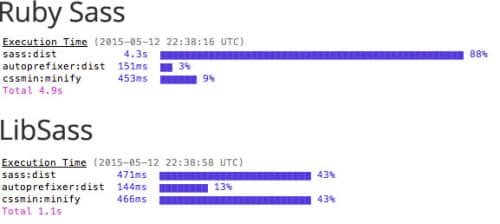
Swapped Ruby Sass for LibSass to compile Sass using Grunt, reducing the speed to 1/18th the compile time for a small project and nearly 1/5th on our company’s website.
You can grab my Grunt starter boilerplate here. (edit no longer up)
-
Dear Web Developers Stop Assuming Chrome Has Flash
I’ve been rolling for quite some time with Flash disabled in Chrome for performance reasons (battery life on my laptop) and security (flash cookies), however there’s a difference from surfing the web with Safari/FireFox without Flash and Chrome and it looks like this:
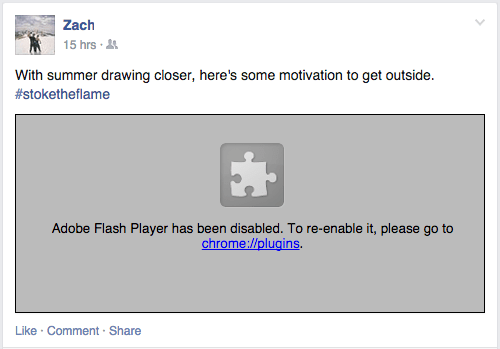
Sadly this isn’t limited to FaceBook, if you’re designing to the browser, you’re doing it wrong. In the day of age of feature detection and progressive enhancement design patterns, this shouldn’t be a problem.
-
boilerplate for grunt
Grunt has been on my mind as I’ve decided to update my work flow.
This easily the best list of performance optimizations I’ve seen for Grunt/Gulp, some of which are tasks I live by, and some are new to me. It’s a “best of…” for grunt tasks to make your front end web deving more efficient.
-
An unordered list of things I’ve learned from two years of blogging…
Not one for anniversaries but realized today that I’ve been blogging for 2 years as of April 9th. I started this as side-project to compliment my portfolio, and to establish a controlled public presence as I’m absent on most social networks.
While, I cannot give much credit to my blog, it has helped as I’m working for a much better company than when I started this, in a new city.
Things learned:
Quality not quantity counts: The posts that have the most traction have usually been ones I’ve spent more time on. It’s cliché, I’ve read it before but its true.
Tumblr Likes/Hearts/Reblogs mean almost nothing when it comes to stats. See Tumblr likes vs Page Views, for a break down.
Web Development doesn’t bring the hits. My most popular articles are mostly Apple related.
Building up traffic takes a long time. I once ran a site that got 150,000 visitors a day, I haven’t achieved one what I’d get in a single day half of that in two years.

Useful Posts tend to attract the most attention. My most popular post by far and away was a list of fixes I discovered when trying to make Far Cry 4 work. I’m not a big gamer, but figured it was worth post. Other big hits have been my recommended list of Mac Pro Upgrades, and my guide to using iFile to upload custom ringtones to iOS. Reviews tend to do alright too, my 9 months with CodeKit 2 has been ever-popular.
Tumblr is a great blogging tool that is used rarely by bloggers. Tumblr is mostly a place for younger people to re-share things they like in a pinterest fashion, but underneath is a friendly and fast interface that has a writer’s heart.
Things I’ve changed:
Less opinions. Quite frankly no one cares what you think, or specifically what I think about stuff. I have a lot of opinions but are they useful? Not really. I’m not John Gruber.
Stop setting goals for X amount of posts over X amount of time. Unless you’re being paid, don’t worry about frequency long as you’re posting more than once a month.
Write for everyone. Web development is hard enough as it is. As a working professional, I still write for the common folk in mind. Even for the pros, its easier to digest when things are written to be understood by everyone even if it means spending more time explaining every step.
-
My (unofficial) Boilerplate Grunt.js
Intro
Grunt isn’t the easiest world to jump into if you’re new and writing a grunt file that does all the neat stuff is rather cumbersome. There isn’t one magic Gruntfile.js that’ll work for every project as often it’ll require individual tweaks to suite a particular workflow. That said, there’s all baseline list of usual features I need for every project:
To put it into human-speak: I want grunt to compile my Sass to CSS, auto prefix it (write example: add -wekbit-border-radius and -moz-broder-radius when I write border-radius) minify it (remove the white space), and generate source maps for inspect element use, and I would like my JS to hold me to writing with conventions, and uglify my code (change the var names and remove white space to make the smallest js file possible).Lastly, I want grunt to refresh my CSS file (also known as CSS injection) when I make a change so I can see the changes without having to reload.
Grunt Starter Boilerplate
Even as someone who uses Grunt daily, writing fresh Gruntfile.jses is more time consuming that I’d like so I boiled down my base feature set above into an easily installable set without any front end frameworks like Bootstrap or Foundation.
I created a GitHub Project out of it for anyone who’d like to get started with Grunt.
It includes full installation instructions for beginners too! It’s everyting you need to get started with Grunt.js.
-
Improving Chrome’s Battery Performance
The Verge posted “Chrome is still a threat to your MacBook’s battery” but failed to mention one of the main culprits of Chrome: Flash.
Chrome has Flash baked into the browser distribution. Each Chrome update always contains its own version of Flash, and it saves the user from being forever pestered by Adobe flash updates and better yet, you can keep your other browsers flash free.
Chrome’s flash is very easy to disable. Copy and paste into your browser bar:
chrome://plugins/
Click Disable. Crazy part? You probably won’t miss it in 2015, and it prevents nefarious Flash cookies.
Congrats, you are now Flash free. This won’t solve Chrome’s battery life issues but it helps. Disabling plugins help too as massive javascript libraries contained in some lesser plugins can cause excessive CPU usage.
The Verge’s article insinuates that Apple has some sort of secret sauce (API?) to make Safari better at Battery life but truth is, Chrome’s fast development cycle puts features over optimization. That’s it.
Now, I’d be happier if Chrome crashed less….
-
The Apple Watch Analogy
My buddy and I were debating the Apple Watch after the miserably titled Wired article: “iPhone Killer: The Secret History of the Apple Watch”. Assuming that the Apple Watch has the ability to become a standalone untethered unit it seems abundantly apparent:
The Apple Watch is to the iPhone as the iPad is to the MacBook.
Assuming the Apple Watch gains the ability in a few years to have its own cell service, I have a feeling there’ll be a subset of users who eschew the smartphone altogether.
Yes, there’s a lot of comprises: only voice to text, potentially no camera or a severely lower quality one, no access to the internet at large outside of apps, and so on but there are a subset of users who go tablet all the time, and never use a desktop. I don’t know how those people operate but they do it. The iPad is inferior from many standpoints to a desktop but its form factor and experience still manage to meet the needs of many people.
Just as I am not a fan of tablets, I doubt I’ll be sold on the smartwatch but my opinion isn’t the only one that matters…
-
Another April 1st… Best and Worst
The small company I work for, posted an April 1st joke with several orders of magnitude more convincing than than companies with hundreds to tens of thousands more employees. April 1st seems to bring out worst in corporate jokes: Chrome reaction Selfies, Unleashed “Dog On A Stick” selfies, Honda’s Safety Selfie Cam, ThinkGeek’s Do It YourSelfie 360 Motorola Selfie Stick…
Worst
Achieving worst April 1st joke takes more effort than the best, since most are orders of terrible. With all the competition, this years goes to NTNews for APRIL FOOLS JOKE: Four-wheel-drives will be banned from all Territory roads from next year.
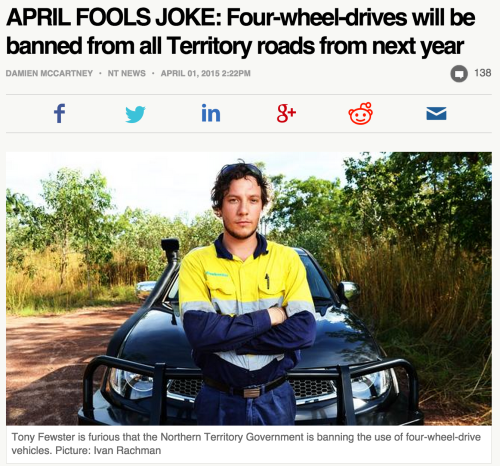
Yes, the title is in all caps proceeding the article shows so much absolute disdain for the buttfuckery that constitutes April 1st, that one wonders why bother? Unlike other no-votes-of-confidence, this gets special merit for its absolutely zero-commitment. No matter what was written, the punchline was spoiled before the user makes beyond the first three words. APRIL 1ST HA HA! GET IT?
Best
The best easily goes to A random tweet, by someone named Joe Heenan.

-
Yosemite OS X 10.10.2 Wireless Woes
Prior to writing this, my experience with Yosemite has been mostly positive other than the egregious usage of Helvetica, which was easily remedied.
However, on my work MacBook Pro Retina early 2013 (15 incher/i7) has been borked since my update recently to 10.10.2. My wifi speeds dropped abysmally, with transfers topping out at 21k a second, usually much lower.
After trying a boat load of voodoo tricks, such as deleting plists and saw a reddit post recommending killing discoveryd (not the best idea), and I still may yet try reinstalling mDNSResponder. That said, here’s the fix.
The quick fix
However so far there is a fix, and anyone who remembers OS 7 through OS 9 will remember the magic of Zapping the PRAM and its miracle working to make bad SCSI chain start magically working.
- Shutdown or reboot your Mac
- Hold Option, Command (⌘), P, and R and power up the Mac (or hold while rebooting), this has to be done before the white screen appears.
- Hold until you hear the boot chime for a second time.
Notably, the problem may creep back and you’ll have to do this again. I managed to last a week before I had to rezap the PRAM. This hopefully will get you by until Apple manages to fix its networking woes.
A little history…
So what is the PRAM? Back in the “classic days” of OS 7, OS 8 and OS 9, Mac OS stashed important OS settings in the first meg or so of memory, referred to as the Parameter RAM. In early Macs, these settings were stored by battery by battery so they were not lost when powered down.
Later Macs switched to NVRAM (non-volatile RAM), which is the same concept as PRAM, settings that are stored by battery (Screen resolution, network ports available, Speaker volume, startup disk selection, Recent kernel panic information, if any) outside of the computer’s disk storage. The term PRAM carries over as legacy as well as the key commands. The term PRAM is still used interchangeably even if not technically correct.
/Edit: 5/30/14:
OS X 10.10.4 reverted back to mDNSresponder. Goodbye discoveryd, upgrading to 10.10.4 should solve any major networking issues with Bonjour and OS X.
