-
How to fanboy - the AppleInsider.com way
Next-gen USB connector a reversible challenge to Apple’s Thunderbolt & Lightning - Apple Insider
Nothing beats AppleInisder.com for its lack of journalistic integrity.
USB 3.0 isn’t a challenge to Lightning Cable. Lightning cable is USB 2.0 with a different connector… with annoying DRM chips. Thunderbolt and USB are both technologies that Intel shepherds.
The article itself isn’t as bad, but misses the fundamental point that USB 3.1 isn’t due out until 2016. Thunderbolt 3.0 could easily be on horizon but that time, increasing its bandwidth 2x to 40 Gbps (5 GB per second) or even higher.
Don’t get your hopes up for PCIe 16x speed in two short years. Its 128 Gbps, bi-directional.
-
Stop Freelancing
I’ve been “freelancing” part time for the better part of the past 4 years and full time for the past 8 months, and if there’s one thing I’ve learned it’s that telling people you freelance will garner responses that manage to combine a jealousy of your freedom and a subtle tone that silently says,
“A freelancer? That’s cute.”
So what did I do? I stopped freelancing and started my own company. I came up with a business name[1], filed for a business license, and as of recent finally even got myself a desk with a fancy “Suite” address in a coworking building. - Robert Nealan, robertnealan.com
I’ve never freelanced, nor am I looking to enter the fray but as someone on the other side of the table who occasionally deals with freelancers/contractors/consultants on projects, I like this strategy. It signifies that your contracting is serious endeavor as opposed to a passing phase in your career.
-
ColorSnapper Review - The $5 utility that every interface designer - web designer should have

ColorSnapper Review
For many of us, grabbing a single color often mean launching an application, such as Photoshop, selecting the eye dropper tool and then selecting the color, clicking the color tool, and copy and pasting the color HEX value, simply to life a single color value from an image, button, graphic or so forth. Its a cumbersome process, and unnecessary.

Color Snapper is one of those no brainer utilities that should be part of OS X, as an extension of the OS X color selector. By now you’re probably familiar with the OS X color selection’s magnifying glass. In case you’re not, any application that uses the OS X default color selector includes a magnifying glass tool that lets you easily sample any color on screen (not limited to the current application). Its a useful functionality as you can select a color from a image in a web browser or Preview or even icon or menu, not just your current app.
Color Snapper extends this behavior to any circumstance. Simply press command-option-c (this can be changed) and you’re presented with magnifying glass cursor that easily lets you select any color on the screen. The color is then copied to your clip board as a HEX value (or RBG, RGBA, HSB etc if you prefer).

The dropdown menu displays most recent picks

p>A utility as simple as Color Snapper could have stopped without any preferencces and it’d been a very useful tool but it also includes a host options, such as key-command selection, format copied to clipboard, notification center, menu bar icon, launch-at-startup, last three colors and magnification level.
Depending on your brand of color values, its easily configged. As a
Front-End Developer, (excuse me), User-Interface Engineer, I live in the world of HEX although I’ve configurred my alternate color value to rbga.
You can easily adjust the magnification level, a nice bonus.
Its hard not to recommend ColorSnapper, at $5, its everything it should be. The only improvement would be allowing area-average color sampling akin to Photoshop’s color sampler.

From the Color Snapper website
-
Google Profiles
Google played a fun trick this morning. Upon booting chromium(my linux browser of choice), I found I that I had to login. Which is strange, I am normally just logged in. No big deal. I entered my information and hit enter.
Then I was presented with new terms for picasa.
“Ah”, I said.
“New terms to really pillage my data for all the ad’s I’m worth”
This did not surprise, as it’s the path Google has been on for quite some time. I accepted the new ridiculous terms and figured someone on HN would be telling me how to disable it by lunch time.
Upon entering gmail I found a surprise. I have new G+ notifications. Why might that be surprising? Because before today my G+ account had been disabled.
Surprise! We helped you get back on G+ even though you didn’t want to be there.
Thanks Google! What a fun way to say, “I hope we can squeeze every dime possible out of your tiny little life. “
Google+ is still weirdly broken, if you’re a Google apps user for work, you need a google+ porfile, nevermind you’ve already been coherenced into it for YouTube or Google Hangouts.
Google+ couldn’t survive or succeed on its own, so taking a cue from early 2000s shovelweare, Google+ comes with every Google product whether you like it or not.
-
Something might be wrong…

Looking at the Amazon ratings of the PS4, there’s a whole lot of blue lights of death.
It’ll be interesting to see how this pans out.
-
Just say no to the 60 hour work week
In the tech and design sectors there’s a lot of folks working long hours, like 70+ hours a week. There’s a certain badge-of-honor-martyr-complex-thing that comes along with it. But let’s set the record straight. Here’s what long hours really mean. - wearemammoth.com
Go read the article linked above, but the TL;DR version is that long hours symbolize a poorly managed company that does not respect its employees.
I had a phone interview with a company that prided itself on 60+ hour work weeks, and the CEO boasted over the phone, “We don’t believe in work-life separation, we believe in work life integration”.
I appreciated the honesty. It was clear that we weren’t compatible.
Even after talking to an engineer interested in recruiting me for his team at Yahoo, I was surprised to hear that most employees work 45+ hour weeks. Its entirely more reasonable but that extra hour is an hour lost going to the gym, taking your dog for a walk, spending time with your significant other, playing with your child, watching a movie,reading book, playing playstation, playing an instrument…. quite simply, being who you are. I’d gladly take a job where I make $60,000 work 8 hour days than $80,000 and work 45+ hour weeks. It doesn’t mean I’m not passionate about the work I do, and I do enjoy it but I do not derive my entire identity from my job.
Often young employees make the mistake that long hours will be seen as dedication. Its not the case. If you need further proof, read “Fire the workaholics”. In fact, read Rework, which is should be read by every employee and every manager as the business manifesto that we all should aspire to.
-
What shipping without a browser for Android 4.4 KitKat really means
So Google is shipping Kitkat without a web browser…

Android 4.4+ KitKat ships without browser app. OEMs have to license Chrome or build their own
“According to Android developer and author Maximiliano Firtman, he just got official confirmation that KitKat “… doesn’t ship with any browser, just the WebView. The emulator has it but not real devices. It’s up to each vendor to create a browser app using the WebView (such as Samsung) or to get license to preinstall Chrome.” - unwiredview.com
What the article doesn’t mention is google plans to auto-update the Chromium-powered WebView, by-passing manufactures. This means Google’s apps and app devs can continually run the latest and greatest even if a device is isolated to Android 4.4 hell years later.
The big news for us web devs is the Chromium WebView finally supports remote debugging.
As a developer, you can count on most manufactures licensing the Google Web suite and your WebView apps will always have access to the latest and greatest.
Its Google’s round-about way to regain some of the control lost on Android and to attack the problem of fragmentation. I’ve been a bigger fan of iOS development strictly from a front end developer’s point-of-view as iOS users are much more likely to update and the Nitro Javascript engine still triumphs Google’s V8 in speed.
That said, I’ll take an auto-updated webview over speed at this point.
-
A mild change...
Previously with this blog, its been a post a day format, but in reality 90% of my traffic is dedicated from roughly ten posts. The takeaway message? Original / Quality posts count more than volume. Instead of trying to make a post day during the weekdays, I’m going to shift the focus to longer, more informative posts.
My readership is still small but growing, to roughly 2200 pageviews a month (amusing considering I created a website at one point garnered, 120,000+ monthly unique visitors for an astounding 1,500,000 pageviews during the same stretch).
-
-
Codekit Mini Review
This review has been left up for posterity, Check out my Review of Codekit 2

You want this, you just don’t know it yet
Codekit, slayer of dragons?
Introduction
Reviews are a funny thing when it comes to full production utilities for coding, they aren’t common and usually exist in the blogosphere. There’s plenty of reasons why, knowledge, scope-of-testing, time and so forth. So to contribute my part, I’ve written a review of Codekit, which I’ve been using as part of my work flow for two+ weeks.
With the rapid development of LESS/SCSS and Front End Developers, User-Interface Designers/User-Interface Engineers, Web Designers, the like are suddenly have yet-another-technology-to-master. LESS and SASS for the uninitiated are pre-processing languages for CSS. Simply put, these are languages that extend the functionality of CSS with variables, mixins, imports, inheritance, operators and other goodies. I’m not here to profess all the features of these languages, but if you’re new to these, I suggest you take a look as for large projects, it can bring sanity. That said, both LESS and SASS need to be compiled to CSS before it can be interpreted by a browser. LESS has the ability to use a JS plugin to compile LESS into CSS in a browser which has alleviated but it isn’t a sure-fire fix. SASS requires compiling through a utility.
Javascript can become even more heady, even the chore of minification can be a headache, let alone uglification and other space saving techniques. To help with some of the issues, JSHint and JSlint have worked wonders to find that one bad comma or random char. It becomes a struggle to do all these while developing.
So without doing chores manually, we’ve seen the the evolution of utilities like Grunt.Js. Grunt.js uses Node.js (which starts to get out-of-scope) to create rules for combining multiple types of actions: preprocessor compiling, minification, JShint/JsLint and all the aforementioned. Grunt can even watch files and recompile when it detects a file change. That said, it requires setting up, which can be sometimes cumbersome and its inefficient. Compiling can take more than just mere seconds on large projects. While working on a telecom-mega-corp’s website, I found myself waiting roughly 20-30 seconds to to compile (On Core i7 2012 Retina MacBook Pro), to make matters worse, it’d routinely error out which then meant having to command line grunt every time I wanted to recompile to see my SCSS changes as CSS.
You probably guessed it by now: The savior
For those familiar with Grunt.js, it does most everything grunt.js does, and then some, for the rest of you, it does everything I just wrote about, but faster and without a command terminal but that isn’t even the best part. Codekit will reload your active tab in Google Chrome or Safari if it detects a change to an HTML/PHP/whatever in your active directory, much akin to LiveReload. That is isn’t even the best part. CSS/SASS changes are injected live, there’s no wait for a page reload, and the changes are animated.
Also as a bonus, Codekit does lossless image optimization, much akin to ImageOptim. However its image optimization, while fast, doesn’t seem to be nearly as effective as ImageOptim. Worse while working on large banking website, I ran the image optimization. None of the assets appeared to have changed as Tower (my Git GUI) didn’t detect the changes. When I ran the Image Optim, one-by-one Tower detected the modified files.
I’ll be interested to see if this is a reoccurring issue with the utility.
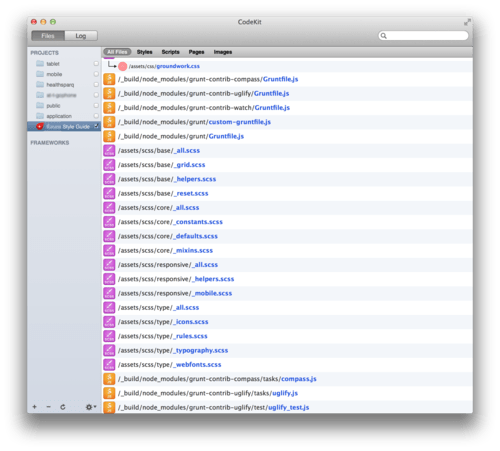
Codekit actively monitors multiple projects
The GUI allows you to ignore files, and set destinations of files, install Compass or Bourbon. The GUI is straightforward, and doesn’t have a lot of depth, that said it doesn’t need it. Most of the time when using Codekit, you’ll be running it in the background. In fact, most of the time, you won’t even be looking at Codekit. Occasionally on a bad compile, Codekit will leap to the front of the screen.
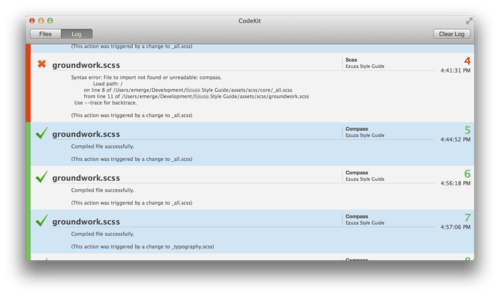
Codekit leaps to the front on bad complies with error messaging
I’ve used it for several projects ranging from a Wordpress site with a theme styled with LESS, a groundwork SCSS built site with PHP to illustrate behavior of user interface, to currently, building out a style guide for a soon to be phonegap built Android app. I’ve used it with both Coda and Sublime Text.
With a little finanggling, I’ve gotten to CodeKit to work with most projects. Codekit is quicker than grunt.js and more reliable, and best of all works with Grunt.js projects.
I can’t say too much negative, I was able to get Codekit to work with a stubborn compass SCSS project, despite it compiling fine with grunt. I’ve hit the brick wall limit of watched files, which is an OS X limitation. Strange, unchecking watched projects doesn’t truly stop watching, meaning I have to manually remove the project from CodeKit.