-
Photosweeper (OS X) Review

Photosweeper Review
At this point in time, photo management is the new norm. Quite simply, we take too many photos to keep track of them manually. The tools we have are pretty good, allowing for quick edits, be it color correction, cropping or other (usually) non-destructive edits. Despite the plethora of options„ there’s quite a vacancy in this space: Whatever your poison is, Lightroom, Aperture or even iPhoto, none of these do much in the way of duplicate detection (outside of exact duplicates).
To the rescue!

Photosweeper’s aim is to find and destroy duplicates of photos. Its a one trick pony but it performs this trick exceptionally well. Rather than simply find exact matches, it instead creates thumbnail images for analysis and then identifies near-matches. It doesn’t matter if they’re different formats (JPG vs PNG vs RAW vs PSD), different resolutions, or even separate photos altogether that are remarkably similar. It also doesn’t matter if you use iPhoto, Lightroom or Aperture or any combination of the three, Photosweeper is capable of finding any and every photo.
For my test, I used my own Photo library, largely in Lightroom 5 and some free floating files. To add to the mix, I have an out-of-date version of Aperture and iPhoto, each with their own respective databases from years ago. Like many , my library spans many years and many cameras. I had photos ranging from a Powershot A70, Canon 300d, iPhone 3G, 4 and 5, Panasonic GM-6 and some captures from a previous employer’s 7D.
My pictures folder totaled 129 GBs. Anything shot it the past three years has been managed by Lightroom, before that…. well, most of my “organization” I handled by drag and drop.
I’ve debated cleaning my Photo library prior but the task never quite made it on my “to-do” list, perpetually on my “Clean one day”.
Init Run

On my first run (in typical user-interface developer fashion) I skipped most of the tutorial screens, eager to see what I could do. It took a moment of confusion as I assumed that I had to import each library one-by-one. I noticed the rather large text suggesting I drag and drop my photos into Photosweeper. I added my Pictures folder and set the scan size to the maximum resolution (128 x 128).
With years and years of photos (23,000 to be exact), I worried that this process may range into the days. It took roughly 2 hours for it to munch through all the photos on my 2008 Mac Pro (2x 4-core 2.8 GHz, 14 GB of Ram) off my 2 TB HDD.
The results appear in real time, you don’t have to sit and wait for the process to finish, you can start identifying duplicates in soon the query makes its first discovery. Photosweeper also works on videos, a nice bonus and worth a mention.
Elegenance
When attempting to identify duplicates, Photosweeper lets you set the tolerance level. I went fairly strict, as I wanted to cut out only exact duplicates, and rid myself of lower resolution/lower quality exports. With the tolerance ramped to maximum, only near identicals appeared as duplicates.
Without much thinking, I adjusted the preview window sizes to maximum and started manually removing duplicates. As far as user-interfaces go, Photosweeper gets an A. Its familiar, in a good way. It only took seconds to figure out user interactions. Anyone used to using a photo manager can dive in without much trouble.

Photosweeper offers a suite of logic markers to identify which photos to keep. I tested out the auto duplicate detection, but found that it was a little more liberal than I wanted. I opted instead to manage my photos manaually but this sort of utility could save hours, if not 10s to 100s of hours for busy professionals.
Conclusion
In the end, I only saved 7 GBs by deleting only exact duplicates out of 128 GBs. Still, most of these were iPhoto photos, running in at about 4 megs a file. I ended up removing around 1000 photos from my computer.
That said, I always have the option go back and review near duplicates, of photos I snapped in rapid succession and the ability to keep my photos under control in the future.
The usefulness of Photosweeper largely depends on how avid of a photographer one is. Users with small libraries will only find limited use for Photosweeper. Bigger the library, the more indispensable Photosweeper will be.
The only other negative I can forsee is that eventually, Photosweeper’s duplicate detection may make its way into Lightroom or Aperture. That said, its up for debate if a hypothetical duplicate detection will function nearly as well as Photosweeper and it could be years before this feature makes it way into either suite. Only time will tell.
Personally I can’t recommend it enough, and I’m not alone. The only other alternative I know of is Gemini - The Duplicate Finder, which aims to detect file duplicates, which can detect duplicate photos but isn’t its primary function.
Full disclosure, Gwinno Software, Inc. offered me a free copy of Photosweeper to play with (no strings attached), they did not offer me any compensation for this review. Prior to any interaction with Gwinno Software, I identified Photosweeper as one of the 53 Mac Only Design & Development Utilities.
-
In the business of destroying jobs
Until now the jobs most vulnerable to machines were those that involved routine, repetitive tasks. But thanks to the exponential rise in processing power and the ubiquity of digitised information (“big data”), computers are increasingly able to perform complicated tasks more cheaply and effectively than people. Clever industrial robots can quickly “learn” a set of human actions. Services may be even more vulnerable. Computers can already detect intruders in a closed-circuit camera picture more reliably than a human can. By comparing reams of financial or biometric data, they can often diagnose fraud or illness more accurately than any number of accountants or doctors. One recent study by academics at Oxford University suggests that 47% of today’s jobs could be automated in the next two decades.
Its only to get bumpier from here..
-
A fantastic list of questions to ask a potential employer
You know that part of the interview where the employer asks you if you have any questions?
Having been on the other side, asking questions is something that employer is actively encouraging you to do, as its another chance for them to promote their ethos.
My basic strategy is to spend 20 minutes before each interview I do and pick some appropriate questions from this list. I’ve tried to categorize them a bit. A lot of these are outright stolen from Edward O’Campo-Gooding’s list of questions, as well as from various people at Hacker School. I’d love suggestions for more! - Julia Evans, jvns.ca
Go read the list that Julia Evans has composed. Here’s a sample of questions. These are primarily tailored to software/web development.
Quality of life
- How much vacation do people get? If there’s “unlimited” vacation, how much vacation do people normally take?
- Is it possible to take sabbaticals or unpaid vacation?
- How many women work for you? What’s your process for making sure you have diversity in other ways?
- How many hours do people work in an average week? In your busiest weeks?
- Is variability tolerated or is everyone expected to be on the same schedule?
- What time do people normally leave work?
- Would I need to be on call? How often?
- How often are there emergencies or times when people have to work extra hours?
- What is your turnover rate like? How many devs were hired last year and how many left?
- What’s your retention rate of women over 1.5 years? Do you think you could’ve done anything differently to keep people who left?
- Do people work on the weekend?
- Do people check in when they’re on vacation? How often?
- Is it possible to work from home, say, 1 or 2 days a week? Does anyone do this? (can be a nice option to have)
A company that discourages you from asking questions about their work environment is likely a company that you may find discouraging.
-
Older Is Wiser - Study Shows Software Developers' Skills Improve Over Time
Older Is >Wiser: Study Shows Software Developers skills Improve Over Time
There is a perception in some tech circles that older programmers aren’t able to keep pace with rapidly changing technology, and that they are discriminated against in the software field. But a new study from North Carolina State University indicates that the knowledge and skills of programmers actually improve over time – and that older programmers know as much (or more) than their younger peers when it comes to recent software platforms. - Dr. Emerson Murphy-Hill, NC State University
This has been making the rounds but don’t get too excited, in our attention deficient summly culture, you might miss the most important part several paragraphs down.
They found that an individual’s reputation increases with age, at least into a user’s 40s. There wasn’t enough data to draw meaningful conclusions for older programmers. - Dr. Emerson Murphy-Hill, NC State University
NPR has reported on aging numerous times. Mental dexterity doesn’t seem to utterly vanish, and I’d be curious to see a study following around 50+ year old programmers. While aging and mental abilities seems to be a mixed bag of research, problem solving seems to improve over time.
-
Interviewing a Front-End Developer
Part of my role at Twitter and Stripe involved interviewing front-end engineering candidates. We were given a fair amount of discretion on how we went about interviewing, and I developed a few different sets of questions that I thought would be interesting to share.
I’d like to prefix all of this with the caveat that hiring is extremely hard, and figuring out if someone is a good fit within 45 minutes is a demanding task. The problem with interviews is that everyone tries to hire themselves. Anybody that aces my interview probably thinks a lot like me, and that’s not necessarily a good thing. As it is, I’ve been pretty hit and miss in my decisions so far. However, I believe this approach to be a good start.
Ideally the candidate has a really full GitHub 'resume’, and we can just go back through their open source projects together. I usually browse their code and ask them questions about particular design decisions. If the candidate has an excellent track record, then the interview largely moves into whether they’d be a good social fit for the team. Otherwise, I move on to the coding questions. - Alex MacCaw, Interviewing a Front-End Web Developer, sourcing.io
Alex particularly focuses in on JS questions, which quickly dives into programming fundamentals.
-
iOS 7 JailbreakPutting your money where your mouth is
iOS 7 hasn’t been jailbroken yet, however there’s a movement to encourage a working Jailbreak.
It takes severe amounts of time to exploit an OS and develop a deployable hack. Those who do are currently good samaritans who receive little in return for their works. isios7jailbrokenyet.com has an answer: a crowd funded bounty for a hack, complete with an impressive array of judges, including iFixit.com’s co-founder Kyle Wiens.

I dropped $5 to the cause. Its easily worth more than that for a working jailbreak. Go to: https://isios7jailbrokenyet.com
-
How Google plans to rule the computing world through Chrome
Are you ready for Google to take over the desktop? You’d better be if you use Chrome. With it, Google is making a play to rule the computing world as a back door to a new app economy.Are you ready for Google to take over the desktop? You’d better be if you use Chrome. With it, Google is making a play to rule the computing world as a back door to a new app economy. - Kevin C. Tofel, gigaom.com
Seeing as how the PS4 uses WebGL for its system UIX, its easy to see this a conclusion. ComputerWorld thinks Google’s end game is Google+, but really, its likely that Chrome is content delivery system and Google+ is the network which Chrome delivers.
-
Linux is mostly on par with Windows 8.1... if you’re willing ignore benchmarks
Ubuntu Linux Gaming Performance Mostly On Par With Windows 8.1…
Given the recent release of Microsoft Windows 8.1, at Phoronix we took 13 different AMD Radeon and NVIDIA GeForce graphics cards and compared the performance between Ubuntu Linux and Windows 8.1 with the same hardware and set of OpenGL games/benchmarks. For AMD and NVIDIA graphics cards with their official drivers, the performance is largely similar between the competing desktop operating systems but there are some performance exceptions.
By exceptions they mean nearly 2x the performance gap on the highest end graphics cards stress tests. Linux wins if you consider OpenArena your game of choice.
I’m still sold on SteamBox as the future of game consoles but let’s not pretend that Steam’s choice doesn’t have anything to do with licensing Windows, the Windows (app) Store and tailoring a complete living room user-experience.
-
Finding the most reliable and fast public CDNs

CDNperf.com has a list of stats for the fastest and most reliable public CDNs (content delivery networks). If don’t already, you should probably let Google host JQuery.
The real surprise is BootstrapCDN leading the way for the latency which makes me wonder if Bootstrap’s CDN happens to be near the same network that CDNpref's
-
Yes, that’s a nice mockup but is it really an improvement?
iDownloadblog (a generally much more worthwhile read than bandwidth waste, Appleinsider.com) recently ran “This jaw-dropping concept totally reimagines Apple’s dull OS X Messages app” which contained screenshots from behance.net’s Message Concept App.

Behance’s mockups iOS 7ify Messages
Lately, I’ve seen quite a few mockups of Apple products, a trend that started with hardware renderings. Now with the advent of dribbble and the clamour to beat Apple to its own punch, I’ve seen some interesting-yet-utterly-flawed-iOS 7 mockups that garnered a lot of praise for looking pretty (Slide to unlock at the top of the screen?).
Now I’m neither a fan of Messages nor a user of messages but as much as the visuals look “good” they are a fundamentally wrong from a user-interface perspective, as scope and functionality should lead design, not the other way around.
Rarely is IMing front and center, but rather an activity that compliments web surfing or work or gaming. Its certainly not a full screen activity, nor one that necessitates any more screen real-estate than it takes to deliver an IM.
Take Adium, the most popular alternative to messages.
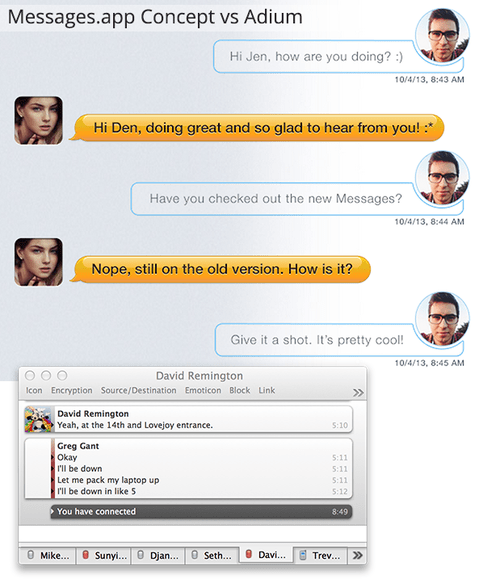
In half the space of the hypothetical Messages redesign, Adium conveys oodles more. Information density isn’t always a good thing, but Adium isn’t presenting an overabundance, and its configured to my personal preferences.
Pretty it is not, but functional it is.
While negative space is something to appraised, think about the most beloved desktop interfaces today: Be it Chrome, Pages, Transmit, Aperture, 1password… All of these apps interfaces get out of the way to present the information as clearly and cleanly as possible with often little dressing. Users aren’t locked into one-app-at-time, and thus shouldn’t be forced into the constraints of mobile user interface design.
For the would-be designers looking to break into the world of user-interface design, If you’re going to convince me that your user-interface is actually interaction design, show me the actual flows… and for the love of Steve Jobs, don’t hide full window mockups.
Give me any day a exceptionally well-thought out wireframe than a pretty PSD. The paint can be applied later. Otherwise you’re putting lipstick on a pig….