-
Generate your own Susy grid with simple for loops
Last week I wrote the Newbie Guide to Installing Susy, and I’m a big fans of Susy as it does some of the heavy lifting for maths for Sass by calculating gutters and columns. However, its documentation doesn’t lead by example so I’ve put together the following CodePen (CodePen last week started supporting Susy) to illustrate how to easily create your own susy grid.
Due to the maths, it make take a minute for this to compile over at CodePen
See the Pen Susy: For-Loop Generated Responsive Grids by Greg Gant (@fuzzywalrus) on CodePen.
-
Resolving CodeKit’s “Compass was unable to compile one or more files in the project” error
In your web adventures you may come across the following problem:
Compass was unable to compile one or more files in the project:/Library/Ruby/Gems/2.0.0/gems/compass-1.0.0.rc.0/lib/compass/commands.rb:14:in `<top (required)>': undefined method `discover_extensions!' for Compass:Module (NoMethodError)
from /Library/Ruby/Site/2.0.0/rubygems/core_ext/kernel_require.rb:54:in `require'
from /Library/Ruby/Site/2.0.0/rubygems/core_ext/kernel_require.rb:54:in `require'
from /Library/Ruby/Gems/2.0.0/gems/compass-1.0.0.rc.0/lib/compass/exec.rb:7:in `<top (required)>'
from /Library/Ruby/Site/2.0.0/rubygems/core_ext/kernel_require.rb:54:in `require'
from /Library/Ruby/Site/2.0.0/rubygems/core_ext/kernel_require.rb:54:in `require'
from /Applications/CodeKit 2.app/Contents/Resources/engines/compass/compass/bin/compass:43:in `block in <main>'
from /Applications/CodeKit 2.app/Contents/Resources/engines/compass/compass/bin/compass:30:in `fallback_load_path'
from /Applications/CodeKit 2.app/Contents/Resources/engines/compass/compass/bin/compass:41:in `<main>':Sounds like a mess doesn’t it? Fortunately, you can resolve this rather quickly as its an internal compiler error.- Go to Codekit’s Preferences and select other tools.
- Select “Use the compass executable at this path” option and click choose.
- Go to Libary/Ruby/Gems/2.0.0/compass-1.x.x/bin/compass and select the execuatable file.*
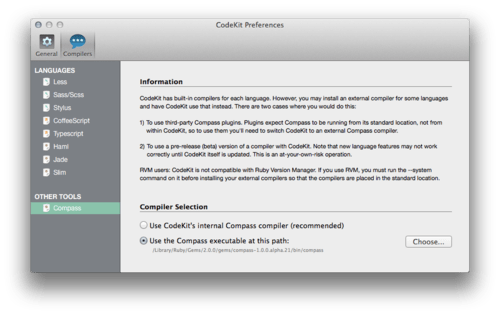
* Note: you may need to install a newer/different version of compass. I’m currently using the pre-release alpha 21 since I need it for susy grids. You’ll need to fire up your terminal and run the following command (it’ll prompt you for your password)
sudo gem install compass -v 1.0.0.alpha.21 --pre(You will want to check the latest version of Compass before running the above command, you may also need to install Sass first.).
-
MS spoofing Safari’s user Agent in Windows Mobile and it doesn’t matter
One of the most significant issues we saw was related to sites not detecting that IE on Windows Phone is a mobile browser and therefore providing desktop content. This often results in sites displayed with tiny text that you need to zoom in to read and then pan around. It also often means more data is transmitted over the phone’s data connection because the content isn’t mobile optimised. Images are large and many more ads are downloaded and shown.
- IEBlog
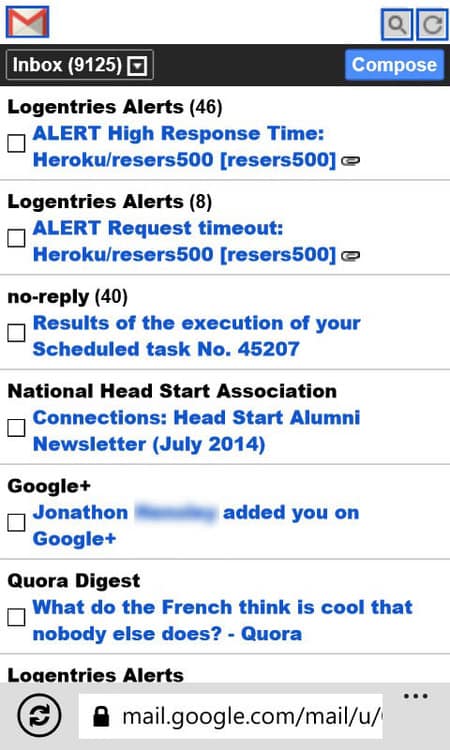
Yesterday I posted this screenshot of Gmail.com running on IE on Windows 8 Mobile. Three things immediately jump out at me:
- This is a band-aid fix. This may serve up more desirable versions of webpages but functionalities that are webkit dependent will not work leading to user frustration and development frustration. (If Windows 8.1 mobile is like Windows 8 Mobile, IE doesn’t support file uploads for instance)
- If you’re still using User Agent strings in the era of Modernizr and Head.js, you’re doing it wrong. Its a simpler and more elegant solution
Quite frankly, no one cares about checking for mobile IE users. If google is willing to serve up the above for Gmail, why should any of us care? I’m not arguing this is the right attitude but it is the reality MS is facing. At my current job, we have one client who actively checks for Windows Mobile glitches, and its only because they run a full-MS tech stack from ASP.NET to Surfaces, to Windows phones and of course desktops.
-
How to get photos off Windows 8 Mobile (windows phone) with no SIM card or MS account
The short answer: Use the internal E-mail Client
This is one of those posts that seems laugh worthy but I spent the better part of the last 40 minutes trying to get screenshots off the lone Windows 8 phone in our office. Its currently running the factory install, we use for testing hence no MS account or SIM card, and it mostly sits in a corner in the office unloved.
None of the default apps on the Nokia phone have any sort of web share, so you’re SOL and require Nokia registration (which appears to require a SIM card) for the Nokia apps.
I should have shot for the lowest tier solution first

Love your iOS or Android device, this is what Gmail.com looks like on Windows 8 mobile
The problems
- Apparently when connected to Wifi only and never have had a SIM card, you cannot sign into Windows Store.
- You cannot use File upload on any webpage. I first tried to sent the screenshots to my iPhone using Good Reader and then a free image sharing service, neither worked
- GMail on windows 8 mobile looks akin cellphone internet on 2007 on a Blackberry. It didn’t even work, no chance for e-mailing.
- The time servers on Windows 8 mobile appear to be messed up and it requires a trip the settings to fix.

Ouch.
-
Having trouble installing Susy Grids? The n00b (newbie) guide to installing Susy Grids on OS X

For some reason, the Susy website doesn’t make it abundantly clear how to install Susy.
I’m going to go ahead assume you have Node / Ruby / Sass installed and Compass. Suzy requires Compass version 1.x.x or later (as it is part of compass).
1. Check your compass versionFrom the Terminal check your compass version:
compass versionIt should return something that looks like this:
Compass 0.12.7 (Alnilam)
 Copyright (c) 2008-2014 Chris Eppstein
Released under the MIT License.Note: Running the compass installer as of writing this will install a 0.x release. You will need to install the prerelease version. If you see Compass 1.0.0.alpha.x or later, skip step 2!.
2) Install Compass prerelease
From the terminal run the following command:
sudo gem install compass --preThis may take a few minutes and you’ll see a lot of install in your terminal
3) Install Susy!
Now we’re finally ready for susy. From the terminal run:
gem install susyCongrats! You should be in business. Note you’ll need to install Node.js, which can be downloaded here, Ruby which which can be downloaded here (OS X comes with it preinstalled), Sass which instructions can be found on how to install here, and you’ll need to set up a compiler like Grunt.js or Gulp.js or an application like CodeKit or Prepros to run compass to compile your SASS.
Happy Coding!
-
Wearables - Solving problems that I don’t have
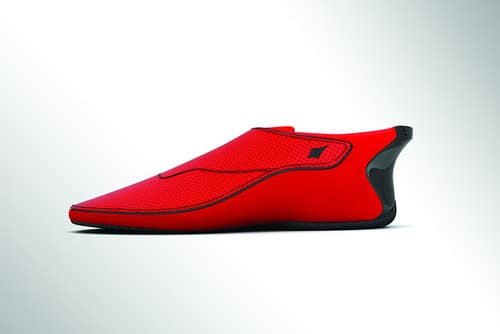
Photo Credit; Wallstreet Journal’s poorly titled “India’s Answer to Google Glass: The Smartshoe”
I’m a bit tired of the wearable revolution. So far the wearable market has been solving the problems I don’t have and the most interesting “wearables” predate the wearable term.
- Garmin Foretrex GPS 101 GPS watch: 2001 >
- Go Pro Video Camerea: 2005
- iPod shuffle: 2005
- Nike+: 2006
- GPS Dog Collar (for hunting): 2008?
What’s interesting is all of these products have been designed for a task, and not a nebulous omnipresent platform, not an always worn such as the much lauded Nike+ Fuelband or Google Glass or even Google Wear watches. While I wouldn’t argue to dissaude to dream big, we’ve had wearable tech for decades in various facets. The only difference today is the mode of thinking as an always on platform. Just as there’s no correct pair of shoes for all situations, its silly to think there’s a wearable correct for all sitations.
-
Favicon overkill…
I asked our luxury automaker client’s agency for a high resolution icon to use as their favicon…
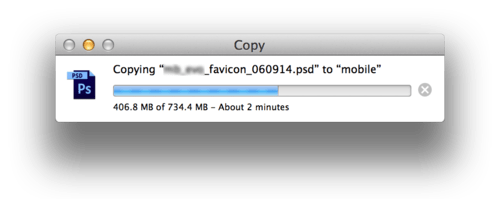
…I can’t tell if they are inept or trolling me, but the 134 x 134 image included vector logo ontop of a smart layer of a 4000 px x 3000 px background complete with multiple images, adjust layers, layer styles, and layer masks.
-
iOS 8 and 10.10 - Symbiotic Harmony
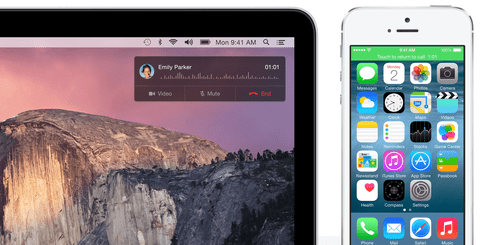
Image credit: Apple.com
For years I have had (and I know many others) the fear of the iOSification of OS X, where OS X slowly regressed from desktop operating system to iOS stand-in. I was unnerved by Lion and Mountain Lion’s feature set of Mac App Store, Push Notifications, Natural Scrolling, Launchpad, full screen apps, GateKeeper and Game Center.
10.9 was either the eye in the storm or the pivot away from borrowing from iOS, which amounts to the best OS X upgrade since 10.3 which drastically improved OS X to the point that it was no longer necessary to boot OS 9. Mavericks may haven’t had much on the exterior, instead of superficial iOS feature looting you had truly desktop features: tabbed finder, tags, time coalescing, app napping, compressed memory which resulted in a magical update that improved performance and increased battery life.
Now we’re getting a unified vision of the path of iOS and OS X, its a unified universe where each operate independently but when paired unlocked a unified experience that no other can offer. Start writing and e-mail and resume on your Mac. Airdrop files easily from iOS to OS X and back. Tether to your iPhone automagically. For the user, the experience becomes even more seamless. It exemplifies the old Steve Jobs maxim: “It just works!”
Developers as are thrown a much needed bone with SpriteKit, Scenekit, Cloudkit, HomeKit and of course Swift. If Mavericks was the retuning of OS X, then Yosemite and iOS 8 is switching the fuel.
Software may not be as exciting to consumers as hardware, but ultimately Apple real strength has always been software. Sure Apple’s hardware offerings are routinely in the highest end camp but they are easily reproduced. The software is not.
-
Things and the internet and complexity
Apple is readying a new software platform that would turn the iPhone into a remote control for lights, security systems and other household appliances, as part of a move into the “internet of things”.
Apple plans to take on rivals Google and Samsung and make a “big play” in the world of smart home technology at its Worldwide Developer Conference on June 2 in San Francisco, according to people familiar with the matter.
This will reinforce the view, held by some in Silicon Valley, that Jetsons-style home automation is the next frontier in technology as growth in smartphone sales begins to slow in developed markets. - The Financial Times
Maybe I’m unimaginative and not visualizing the big picture but I still haven’t thought of practical applications for appliances beyond security, lighting, heating and entertainment which are all systems; not one off devices.
Even as a “user interface” developer *cough* front end *cough* , I see no point to obfuscate my interactions with my refrigerator, oven, dishwasher, washing machine and dryer.
There has to be an obvious gain of functionality/ease-of-use to offset the additional complexity. An iPod despite being more complicated to use than a CD or Tape player has so many advantages that any issues with managing digital music libraries on a computer was easily nullified by the ability to carry massive catalogs of music one’s pocket. Adding wifi/internet/bluetooth support for a car for diagnostics/vehicle health would easily offset the trouble of downloading an app and pairing it with the car. Can we extend this beyond systems and large ticket items?
I look forward to seeing how Apple envisions the future. My guess is they’ll provide the platform (elegant and beautiful in execution) and let the manufactures figure the later out, for better or worse.
-
The life of a Front End Developer
 One of the most dynamic roles in the world of web today is that of the front-end developer. Always keeping up with design and code trends, it is the front-end specialist who keeps a website’s experience on the cutting edge. To understand the role of a web developer, it’s important to…
Entertaining, a little dated (Firefly references, Flash is dead, not much on current JS stacks like Node, Ember, Angular, etc) and I don’t think I know a single Front End Dev that’s a gamer. I’m like the lone dude with a Steam account that I play now and again. Front End Developers as ground don’t quite fit the usual nerd archetype. As a group, they’re more likely to argue fonts faces than Star Wars.
Otherwise, fairly accurate. Coffee is the fuel drives web development.