-
Future is a gated community

Pictured: Mac Pro 2013
Today marks the end of Apple’s last user upgradable machine. Most users will probably see the Mac Pro as an overpriced curiosity but its nail in the coffin for user-modifiable computers. My Mac Pro from 2008 has had several upgrades over the years and is still standing strong, and still a very capable computer.
But that’s the point, 5 years later, my Mac Pro marches on. Apple has been on a slow war against the power user, slowly taking the user out of the pilot seat (tethering them from venturing too far from the mothership).
It started with the MacBook Air, which had soldiered on RAM. Then it migrated to the iMacs, which required a hack to prevent the fans from revving up if the user swapped out the hard drive. Apple then decided that it was time for the MacBooks to no longer have easily replaceable batteries. The final step was the MacBook Pro 15 inch Retina, which famously received a 1 out of 10 from iFixit for its complete lack of interchangeable parts. Apple pushed this same design to the 13 inch MacBook Pro a year later.
Only the red-headed stepchild remained in Apple’s lineup, the oft-forgotten Mac Pro, which received as much attention as such. Through sparse upgrades, it remained the only user upgradable computer, a throwback to an era of computing when users actually opened up their computers from time to time for maintenance.
Today is the day that ends. A Mac Pro purchased in late 2013 will not have the promise of transforming into a better computer in 2018 as my 2008 Mac Pro did. Instead, the separation between a Mac Pro and a Mac Mini or an iMac is that much smaller. Will the Mac Pro 2013 be nearly as viable 5 years later? Thunderbolt 2 is impressive, 20 Gbps (5 GBps) is a far cry from PCIe's theoretical bi-directional 128 Gbps (16 GBps) per 16x slot.
Planned obsolescence has been part of computing since the beginning, but now its embrace feels suffocating for Mac users.
-
Jquery Boilerplate

We’ve seen far too many boilerplates for HTML and CSS but very few for Javscript and/or JQuery.
So, you’ve tried your hand at writing jQuery plugins and you’re comfortable putting together something that probably works. Awesome! Thing is, you think there might be better ways you could be writing them - you’ve seen them done a number of different ways in the wild, but aren’t really sure what the differences between these patterns are or how to get started with them.
This project won’t seek to provide a perfect solution to every possible pattern, but will attempt to cover a simple template for beginners and above. By using a basic defaults object, simple constructor for assigning the element to work with and extending options with defaults and a lightweight wrapper around the constructor to avoid issues with multiple instantiations. - JQuery Boilerplate, GitHub
JQuery Boilerplate is a boilerplate not for just JQuery but everything you need to start a new GitHub Project.
-
When learning to code always type it, do not copy and paste…
I once read (and I wish I could for the life me remember where so I could source it) that when you’re learning to code, always type out the code examples and never copy and paste them. I’m not one for anecdotal information but it stuck with me and I actually have committed to it.
Coding is like music, there’s a rhythm and logic to it. Copying and pasting is the quick way but if you’re a seasoned programmer jumping languages or just learning HTML, type out the statements rather than copy and paste.
You might not understand it all or even most of it but over time you’ll start feeling the patterns and soon you’ll start deciphering the melodies underneath.
-
Going the way of the Dodo

So you’re on the Titanic, and you see a giant iceberg. Do you:
A) Change directionB) Continue your course but much more carefullyC) Continue on your course as if you don’t see the icebergNintendo might as well just hand Apple its keys. Its clearly too drunk to drive…
-
Launchbar
I’ve been tinkering around with Launchbar and got it to work pretty well for entering tasks into Things.app.
Invoke Launchbar and type ADD to bring up the Add to Things action.

Hit the space bar are enter a task with this syntax:
task name #tag1 #tag2 [project name/area name] ::note...I’m a fan of launchbar and Stortz isn’a afraid to get geeky with it.
-
Business cards
I rather enjoyed this, blank business cards:
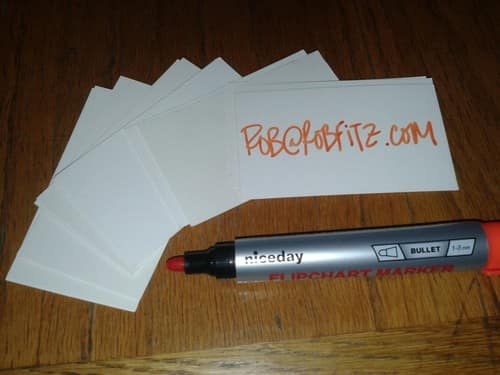
In a pleasant twist, this turns out to be a far better solution than the traditional business card. You can add a call-to-action. The act of creating a card gives you a chance to have a moment with them. You can give the appropriate amount of information. If you have multiple email addresses or websites, you can choose the right one. Nobody forgets which card is yours. And if they run out of cards, you can hand them a pen and have them make you one. It’s great.
I probably wouldn’t recommend this for everyone, this has a very “Designer” or “Avant-Garde” approach. I doubt this would have the same effect for someone in the financial world (but I could be wrong).
That said, I’m stealing this idea….
-
M-Audio Keystation Mini 32 vs The Korg MicroKey 37
There’s been a recent development in the past few years, low profile midi controllers, the Korg Nanoseries, Korg MicroKey series the Akia LPK25, Akia MPK, M-Audio Axiom Air Mini 32 and the most full featured, the Axiom Air 25, and not to mention the M-Audio Keystation Mini 32.
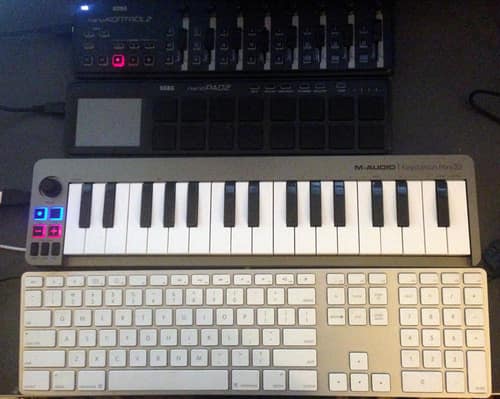
Pictured, Korg Nanokontrol2, Korg PadKontrol2 and the M-Audio Keystation Mini 32 and the Apple USB keyboard
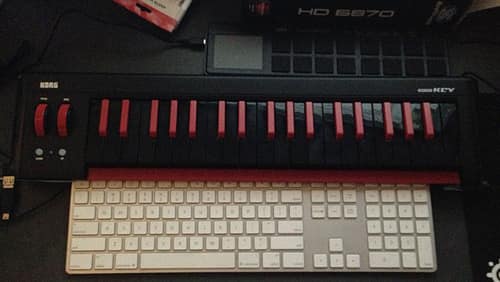
Pictured: Korg PadKontrol2 and the Korg MicroKey 37 and the Apple USB keyboard
Features
The Keystation 32 doesn’t go for too much pizazz, its a simple, it has a single “Volume” knob, best used as a mod or pitch bend, octave buttons, sustain button and Pitch Bend Buttons. Its minimalist to say the least.
The Korg Keystation to anyone who’s messed with midi in the past three decades is pretty familiar: Mod, pitch and octaves on the left and keys on the right. Its very reminiscent of the first stand alone controller I bought over a decade ago, a Midiman keyboard. As a bonus, its also a two port USB, which is a very nice addition. The M-Audio does get a point on having a sustain button, as the Korg doesn’t have a sustain button or ¼ inch input.
Winner: Korg (Barely)
Physical Mod and Pitch Bends are much more useful than a volume knob. The MicroKey 37’s little brother, the MicroKey 25 has a sustain button, oddly enough. Why this was left off is beyond me.
Feel
I tested out a few of the competitors, mostly the KeyKontrol2 and the Akia LPK25 in store. The Korg KeyKontrol2 is nearly unusable, the button feel like plastic drum pads and the Akia feel like a toy.
The M-Audio KeyStation mini 32 keys being adequate sized and enough resistance to gauge velocity. Beyond that, I would not describe it as great or even good. Just acceptable. However, for the size there’s no comparison. It’s the best you’re going to get in roughly 15 inches of width.
While, the Korg was stickered at the same price at my local guitar center, the M-Audio Keystation is a cheaper (and much smaller) keyboard, so it comes as no suprise the Korg wins. The Korg keys aren’t semi-weighted like higher end controllers (Axiom/Axiom Pro) but they offer a steady resistance that’s familiar to lower end midi controllers and synths. The keys aren’t full sized but with a much deeper range of motion, it feels less micro and more like another keyboard. It won’t win awards but its, dare I say good.
Winner: Korg
Size
The greatest liberation is not having to put away the keyboard when you’re done. Even on my large desk, space is a premium as there’s multiple monitors to share with it my ever present keyboard and mouse.
I found despite owning an 88 key hammer action keyboard, my preferred piece of hardware was my Axiom 25 for years, despite being an inferior keyboard, simply due to its size. However, its still massive compared to these two keyboards.
The Keystation 32, while wider than the Korg NanoSeries, is still small enough for a backpack. Where portability and space is concerned, the M-Audio wins hands down.
Winner: M-Audio
Final Thoughts
Its best to go to a local dealer to see its right for you. Picky Keyboardists will find the M-Audio lacking and purists will find both woefully inadequate to the weighted hammer action keyboards on the market.
Both keyboards are plug and play. They both worked perfectly fine with both Cubase 6 and Logic X. I’m retiring the Axiom 25 and I’m going to keep the Korg. The Microkey 37 has some baby fat that could be reduced but 3 full octaves is liberating after years of 25 keying.
The M-Audio Keystation sells routinely for $50 at sweetwater where as the Korg MicroKey is $80. The Keystation is an ideal mate for the traveling musician or iPad musician. Its inexpensive enough to make it an addition to anyone’s midi instrument collection.
The Korg is built to be a daily workhorse. True pitch bend and modwheels are tough to beat. The worst mistake is not including some way to either connect a sustain pedal or a button. I had to run a sustain pedal to my Korg padKontrol, and assign it to Midi CC 64 for sustain pedaling.
-
Hide All your files

Finally got around to installing Mountain Lion on my Mac Pro last month and had with All My Files.
Finder > Preferences > Sidebar and remove the check on All My Files.
-
Srcset, your new friend
Here’s something to brighten your monday:
WebKit has made some serious news by finally implementing the
Mat Marquis, Smashing Magazinesrcsetattribute. As Chair of the W3C’s Responsive Images Community Group, I’ve been alternately hoping for and dreading this moment for some time now. It turns out to be good news for all involved parties—the users browsing the Web, most of all. -Responsive images have certainly been a bane for Front End Web Developers. Forcing non-high density display users to load high resolution assets is a bandwidth waste, not to mention slows down the user experience.
As Jason Grigsby said, “IMG Tags Suck for Responsive Web Design”. Prior to the srcset set tag, we front end developers have had to rely on javascript or serverside CDN solutions, often creating a lot of extra work in the process.
Now we have a simple browser based weapon.
Here’s what a sample code would look like
<img src="low-res-default.jpg" srcset="high-res.jpg 2x">srcset will be ignored by unsupported browsers, and the high resolution asset will be automatically loaded if the browser uses greater than or equal 2x pixels per CSS pixel.
You’re probably thinking, “What about non-webkit browsers?” Currently overwhelmingly mobile users, (people most likely to have high density displays) use webkit, whether they know it or not.
Those looking into responsive design for the first time or new to responsive design should read, A pixel is not a pixel is not a pixel.
-
M-Audio Keystation Mini 32 vs The Korg MicroKey 37
There's been a recent development in the past few years, low profile midi controllers, the Korg Nanoseries, Korg MicroKey series the Akia LPK25, Akia MPK, M-Audio Axiom Air Mini 32 and the most full-featured, the Axiom Air 25, and not to mention the M-Audio Keystation Mini 32.
Pictured, Korg Nanokontrol2, Korg PadKontrol2 and the M-Audio Keystation Mini 32 and the Apple USB keyboard
Pictured: Korg PadKontrol2 and the Korg MicroKey 37 and the Apple USB keyboard
Features
The Keystation 32 doesn't bring much pizazz. It's a simple, it has a single “Volume” knob, best used as a mod or pitch bend, octave buttons, sustain button and Pitch Bend Buttons. It's minimalist, to say the least.
The Korg Keystation to anyone who's messed with midi in the past three decades is pretty familiar: Mod, pitch, and octaves on the left and keys on the right. It's very reminiscent of the first stand-alone controller I bought over a decade ago, a Midiman keyboard. As a bonus, its also a two-port USB hub, which is a very nice addition. The M-Audio does get a point for having a sustain button, as the Korg doesn't have a sustain button or ¼ inch input.
Winner: Korg (Barely)
Physical Mod and Pitch Bends are much more useful than a volume knob. The MicroKey 37's little brother, the MicroKey 25 has a sustain button, oddly enough. Why this was left off is beyond me.
Feel
I tested out a few of the competitors, mostly the KeyKontrol2 and the Akia LPK25 in store.The Korg KeyKontrol2 is nearly unusable, the button feels like plastic drum pads, and the Akia feel like a toy.
The M-Audio KeyStation mini 32keys being adequate sized and enough resistance to gauge velocity. Beyond that, I would not describe it as great or even good. Just acceptable. However, for the size, there's no comparison. It's the best you're going to get in roughly 15 inches of width.
While the Korg was stickered at the same price at my local guitar center, the M-Audio Keystation is a cheaper (and much smaller) keyboard. Bt default, the size difference makes the Korg the better unit. The Korg keys aren't semi-weighted like higher-end controllers (Axiom/Axiom Pro) but they offer a steady resistance that's familiar to lower end midi controllers and synths. The keys aren't full-sized but with a much deeper range of motion, it feels less micro and more like another keyboard. It won't win awards but its, dare I say good.
Winner: Korg
Size
The greatest liberation is not having to put away the keyboard when you're done. Even on my large desk, space is a premium as there's multiple monitors to share with it my ever-present keyboard and mouse.
I found despite owning an 88 key hammer action keyboard, my preferred piece of hardware was my Axiom 25 for years, despite being an inferior keyboard, simply due to its size. However, it's still massive compared to these two keyboards.
The Keystation 32, while wider than the Korg NanoSeries, is still small enough for a backpack. Where portability and space is concerned, the M-Audio wins hands down.
Winner: M-Audio
Final Thoughts
Its best to go to a local dealer to see its right for you. Picky Keyboardists will find the M-Audio lacking and purists will find both woefully inadequate to the weighted hammer action keyboards on the market.
Both keyboards are plug and play. They bothworked perfectly fine with both Cubase 6 and Logic X. I'm retiring the Axiom 25, and I'm going to keep the Korg. The Microkey 37 has some baby fat that could be reduced but 3 full octaves is liberating after years of 25 keying.
The M-Audio Keystation sells routinely for $50 at sweetwater whereas the Korg MicroKey is $80. The Keystation is an ideal mate for the traveling musician or iPad musician. It's inexpensive enough to make it an addition to anyone's midi instrument collection.
The Korg is built to be a daily workhorse. True pitch bend and mod-wheels are tough to beat. The worst mistake is not including some way to either connect a sustain pedal or a button. I had to run a sustain pedal to my Korg padKontrol, and assign it to Midi CC 64 forsustainpedaling.
Edit: August 25th, 2019 - Minor copy editing, links updated to work.
-
How to Set-Up A Korg NanoKontrol 2 with Cubase (OS X)
After being irked by the lack of proper instructions (the manual isn’t the most helpful and contains a few errors for Cubase), I decided to write this guide.
This tutorial should be largely the same for Cubase 4-7on OS X or Windows although you may notice minor disparities.
Step 1
Download the drivers here (click on Support and downloads) and install them.
Step 2
Boot the NanoKontrol in Surface mode.
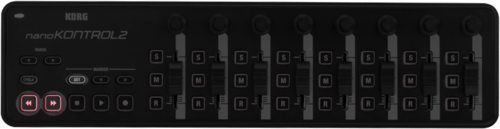
Hold down the Set button under the marker section and the fast forward and rewind buttons, and connect the USB cable.
Step 3
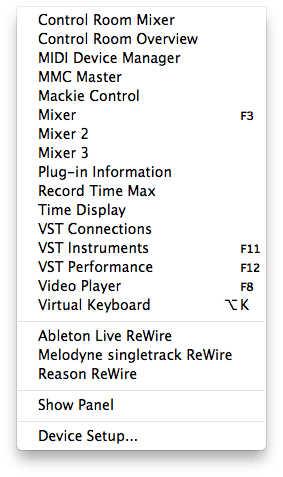
Under the Devices Menu, select Device Setup
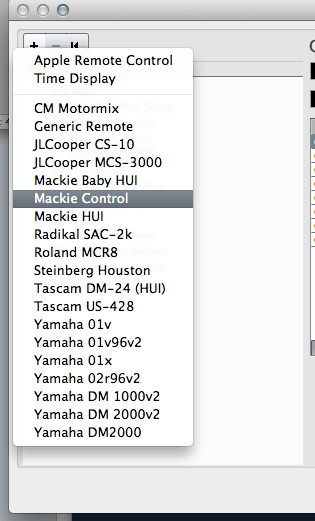
Then click the + symbol and Add a Mackie Control
Step 4
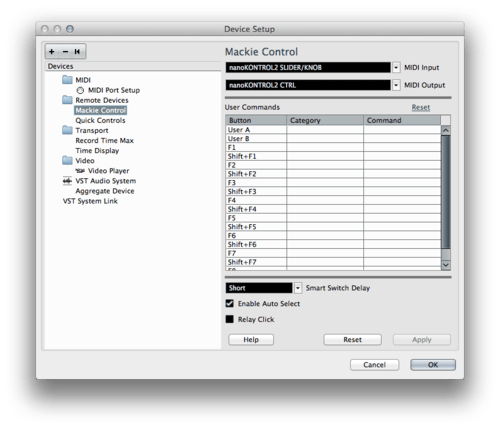
Select the Mackie Control in the Device Setup window and set the Inputs and Outputs to the Padkontrol
And do the same for Transport controls
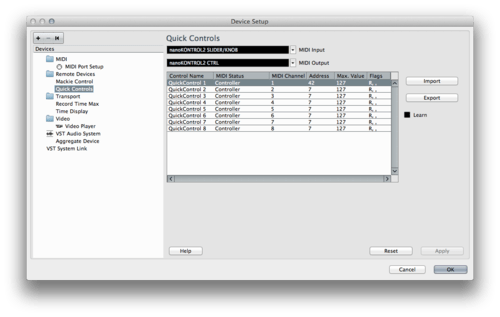
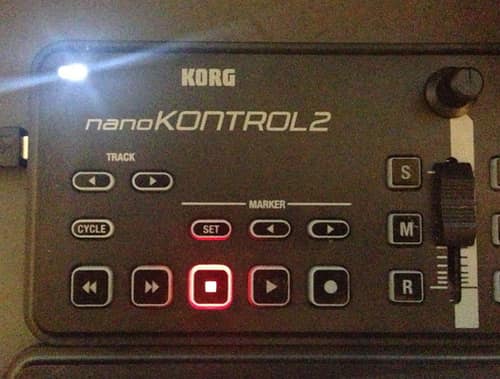
If done properly the transport buttons should reflect your current play status (mostly likely the stop button as pictured)
Enjoy
-
How to Set-Up A Korg NanoKontrol 2 with Cubase
After being irked by the lack of proper instructions (the manual isn’t the most helpful and contains a few errors for Cubase), I decided to write this guide.
This tutorial should be largely the same for Cubase 4-7on OS X or Windows although you may notice minor disparities.
Step 1
Download the drivers here (click on Support and downloads) and install them.
Step 2
Boot the NanoKontrol in Surface mode.
Hold down the Set button under the marker section and the fast forward and rewind buttons, and connect the USB cable.
Step 3
Under the Devices Menu, select Device Setup
Then click the + symbol and Add a Mackie Control
Step 4
Select the Mackie Control in the Device Setup window and set the Inputs and Outputs to the Padkontrol
And do the same for Transport controls
If done properly the transport buttons should reflect your current play status (mostly likely the stop button as pictured)
Enjoy
-
How phone batteries measure the weather
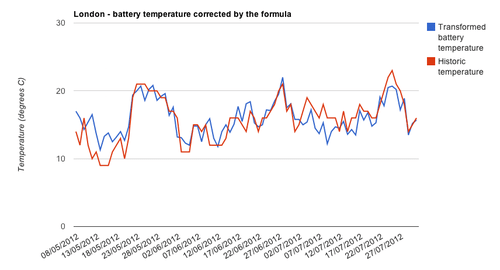
After 6 months of data collection, we chanced on an unexpected relationship. Aggregating daily battery temperature readings to city level revealed a strong correlation with historic outdoor air temperature. With a mathematical transformation, the average battery temperature across a group of phones gives the outdoor air temperature. - OpenSignal, How phone batteries measure the weather
Pretty impressive, all all the graphs are interactive. The find isn’t mind blowning, its known that batteries do discharge energy more quickly in cold weather.
-
Why I sold my Novation Lauchpad and Akia APC-40
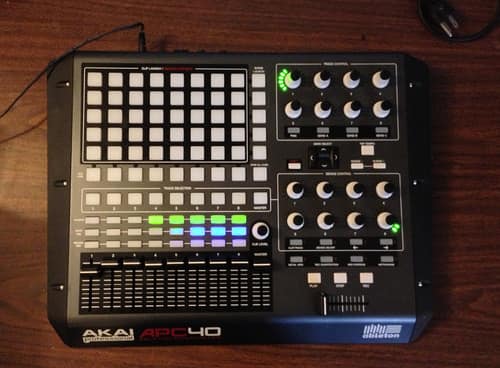
Image of my APC-40 before going on Craigslist
Like a good many people, I’m on iTunes. Well not me per-say, but my buddy Tyree Harris. Together we produced two albums, Realmatic and Financial Aid The Trials and Tribulations of the 21st Century College Student. It took a lot of time and energy but we did it. Tyree even opened for RDJ2 and has some fantastic photos to show for it. I do not.
Performing Hip Hop live is a craft like any other music. I make instrumentals, I never thought I’d be on stage, at least not as a DJ. When we walked on stage in front of 4000+ people, I plugged in my MacBook, and hit my spacebar and walked off. Not cool.
For the next 2 years I started experimenting with live Hip Hop. I’ve seen a lot of hip hop acts live, just to name a few: Common, Talib Kweli, Little Brother, The Roots, Nas, Atmosphere, Cunninglynguists, Macklemore (back when he was opening for Blue Scholars), and many many more. I’ve seen some great sets and a lot of bad ones.
Hip hop DJing brings a nice element of “liveness” but its not exactly a show stopper. Most of the time you’re just cueing tracks and fading in but it gives you some flexibility and the ability to manipulate the performance, even if fractionally. Its much more exciting than a MacBook with iTunes.
That said, the best live acts usually incorporate more. The Roots rock a full on Band. Macklemore came on stage with a Violinist, Atmosphere had a keyboard, bassist, guitarist, vocalist and of course DJ. Tyree and I didn’t have that luxery, we were just a two man show.
When I saw Kidz in the Hall, Double O put in work: vocoder, rapping, turn tables, drum pads… you name it and he was on it. Budo (DJing for Grieves), played the guitar and trumpet in addition to his DJ duties. Both were the classic two man show.
I decided I liked what I saw and what I heard, problem is I make instrumentals. I fumble around on a keyboard and play (With some skill) the drum pads for sample triggering.
Ableton Live
Ableton has wowed me for years, its fast and easy to use. Its not part of my work flow but really spiffy. I decided it was time to try my hand at Ableton for live shows.
I chopped up several songs into loops and added additional loops for breaks and remixes. It was very cool and very awesome. I was performing (at least in my mind) live. My friends who saw it were impressed, although it always started with a conversation explaining what I had done which should have been the red flag.
On a whim purchase, I scored a set of Numark NS7s, which I had pined over for about two years. Suddenly I had a dilemma: Serato or Ableton.
I transitioned my set to have two pieces, the classic hip hop combo: DJ + MC and a post show Ableton performance.
Night of the concert went well and Tyree and I performed, it was our first set and the show went exceptionally well even if the turn out was a little thin.
Post show I fired up Ableton. I realized quickly no one really cared. Why should they? There’s no context for triggering loops, or FX. What was I doing to manipulate the sound? Did that nob twist actually tweak the sound or was it part of the track?
I quickly decided to break down the set after 15 minutes and let the party commence. I wasn’t miffed or upset but I got far more compliments about the music I played BEFORE the show than the music after.
Ableton Live isn’t inferior, nor is it wrong but it isn’t the right software to make the impression. Instruments have immediate results. A guitar chord is heard as the strum happens, a horn blares when it is blown, a cymbal crashes as its hit, even a turn table scratches when the record slips. Everyone thing has a direct result.
Twisting a knob is a lot more innocuous. Pressing a glowing button is the same. Triggering loops can be impressive with the right audience but there has to be a dialog or understanding before. The “risk” of error isn’t communicated, a loop could easily be triggered at the wrong time, creating dissonance but what good is the risk if it can’t be interpreted? You could make a full 16 bar loop or four 4-bar loops, would the audience even know?
Even if someone has never seen an MPC, tapping the pads is pretty easy to understand. Sadly, tapping an Ableton surface doesn’t have an analog that’s easily decipherable. Even watching Ableton performances, I’m not always exactly sure which elements are user controlled.
What finally killed Ableton for me was the lack of support for Serato Itch or DJ and that Serato DJ added in Midi support for external controllers. I can trigger sounds with my drum pad AND man the turn tables. Audiences dig it, much more than flashing LED lights. Why? Because the one to one results are easily seen and heard.
-
NProgress.js - A slim progress bar JS
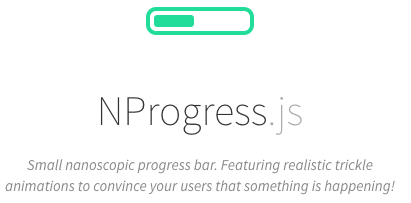
Absolutely gorgeous and non-obtrusive. The graphic above isn’t indicative of the actual progress bar :)

This screencap doesn’t do it justice. Go here to see it for yourself.